If you use FreeAgent and have been using the flat rate scheme but want to change to the standard VAT scheme then some settings need to be updated.
Before that you will need to write to HMRC to confirm you're leaving the flat rate scheme - see our article HERE on how to do that.
With regards to the FreeAgent settings, you will need to change the VAT return settings for the period in which you are changing from the flat rate to the standard VAT scheme.
Let's say that you are leaving the flat rate scheme with effect from 1 April 2017 and your VAT quarter is for the period 1 March 2017 to 31 May 2017.
What you will need to do is split this VAT quarter into two periods:
- 1 March 2017 to 31 March 2017 - on the flat rate scheme
- 1 April 2017 to 31 May 2017 - on the standard scheme
To do this, in FreeAgent go to 'Taxes' , 'VAT'
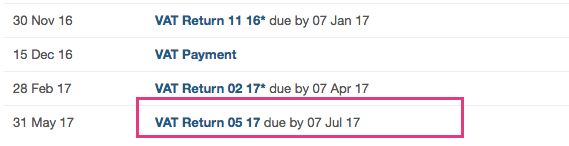
Then go down to the '05 17' VAT return and click on it:
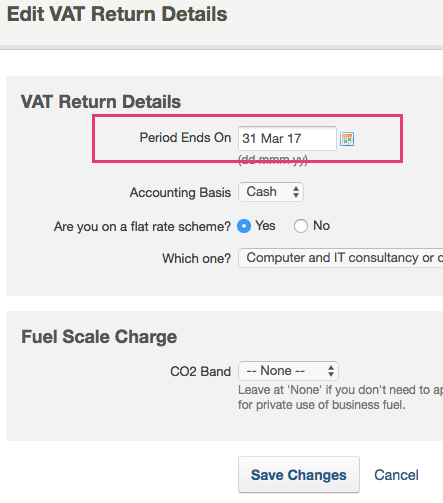
Then on the next screen change the date to 31 March 2017 and leave the settings on the flat rate scheme. Click 'Save Changes'
This will then take you back to the VAT summary page and you should now have a VAT period called '03 17' which is on the flat rate scheme.
You should also have a VAT period called '05 17' which you can click on and you will need to change the settings on this to NOT be on the flat rate scheme and click 'Save changes'
You will then be taken back to the VAT summary page.
You are now left with two VAT return periods for the quarter:
- 1 March 2017 to 31 March 2017 (03 17) - on the flat rate scheme
- 1 April 2017 to 31 May 2017 (05 17) - on the standard scheme
You will have to manually combine the figures on these two VAT returns and then file a single VAT return directly through HMRC VAT online, not through FreeAgent.
This is because FreeAgent can't handle the filing of two different VAT calculation methods for one VAT return (I don't believe any system can).
Once you have filed the VAT returns you will need to mark them as 'filed' on FreeAgent (do the oldest period first), by going into the VAT return, click on the 'unfiled' drop down and select 'mark as filed'.
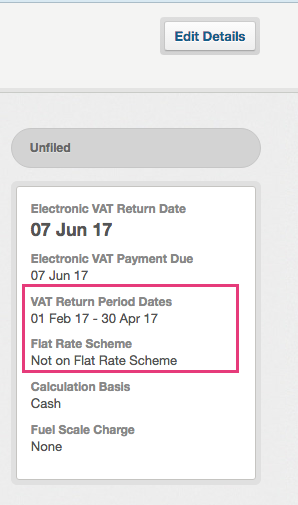
Future VAT returns beyond this quarter should be fine to file through FreeAgent as they should carry on with the new settings of being on the standard VAT scheme, but you should double check the VAT settings of the future VAT returns before filing, which you can do by checking the right hand side of the VAT return summary page which looks like the below example:
0 Comments